Saturday, 20 August 2011

Flip Flops Flipped

I have a dark frosted glass computer desk and cleaned it for the first time in a while yesterday and thought "hey, I could get some good reflections in that now it's clean"!!

I looked around the room for something to try it out with and spotted my new North Face flip flops.

Here is the resulting picture...


As usual, click on the image to enlarge

Wednesday, 17 August 2011

Camping - Back To Basics

I recently went camping with a group of friends down in Swanage. I took my trusty S2 but the rechargeable batteries which I juiced up before the trip appear to have given up the ghost :(

I therefore, had to rely on my iPhone 4! I haven't taken many camera phone pictures recently as I had an iPhone 3G for 2 years and the camera was really awful so got out the habit of taking quick snaps with the phone. The iPhone 4 is OK during the day and the HD video is pretty good but the camera does struggle in low light and the flash isn't anything to write home about.

Anyway, here is a quick compilation all my iPhone pictures and videos from the weekend.


Sunday, 14 August 2011

Night Light Fun

I went out yesterday evening to do some night photography with Jez from jezwhitworth.co.uk. We had planned to do some night sky / lunar photography but as usual the British weather was a let down and it was over cast.

But, not ones to be beaten we still headed out with our kit to the Clarendon Palace Ruins just outside Salisbury.

Had a really enjoyable evening playing around with cameras, flashguns, torches and LED rings. We did most of the shots on Jez's camera so look forward to seeing how they turned out but here are a few that I did take.

This is me on the DIY LED ring and Jez light painting the flowers


Another shot with the DIY LED ring


A quick shot of the Cathedral captured from the lookout on the way back home


As usual, click on the images to enlarge

Monday, 18 July 2011

Sea Sunday

A couple of photos taken on a recent Sunday walk along the beach down at Hengistbury Head.


Tuesday, 28 June 2011

Light Painting - Behind The Scenes

I said back in my LED Lamp post that I would knock up a quick guide on how to create those types of images and as promised, here we are!

Before we get started, here are a few things that you'll need:-

  • -Camera :)

  • -Tripod - Not essential but if you haven't got one then you'll need to put the camera on a firm surface and make sure that it does not move between shots

  • -Subject matter (for this purposes of this guide, I used a Champagne bottle

  • -Torch or other light source


  • Right, now we can get started

    1. Set up your shot with the elements that you want to include. I just went for the bottle with a plain black background.

    2. With the room lights on, focus on your image (I just used auto focus). Once focused switch the lens to manual focus - This will stop it trying to focus once the lights are out.
    Switch the camera to a long exposure mode. I used the camera in manual (M) and set it to bulb mode with the largest aperture.

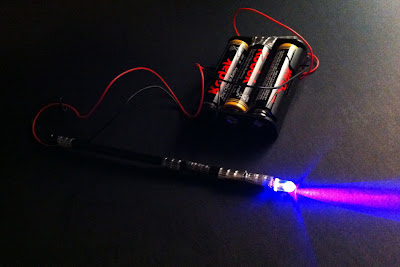
    3. Switch off the lights and take some shots while illuminating the subject matter with with your light source. I used a home made UV light as seen below.


    Here is my image of the Champagne bottle lit by the UV light
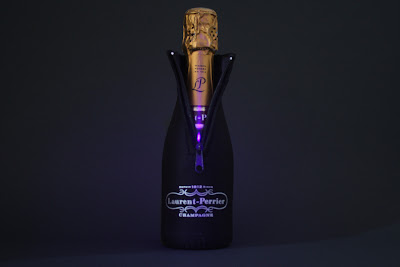

    (3 second exposure at f/4.5)

    4. Right, with that shot in the bag you now can now take the light painting arty shot. I swirled my light around the bottle but you can do anything that you fancy.

    Here is my image of the UV pointer swirling around the bottle
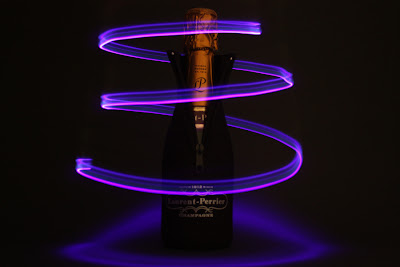

    (2 second exposure at f/4.5)

    5. You now have to combine the 2 images using your image editing software. There are various ways that you can do this but I followed the simple steps below...

  • -Open both the images in your preferred image editing software

  • -Copy the second image that was created (light painting one)

  • -Paste this as a new layer in the first image that was created

  • -Set the layer blending mode to Screen


  • This is basically it - You may want to make many other adjustments to the image but this is a simple guide to the fundamentals of creating this sort of merged light painting image.

    Here is my final image
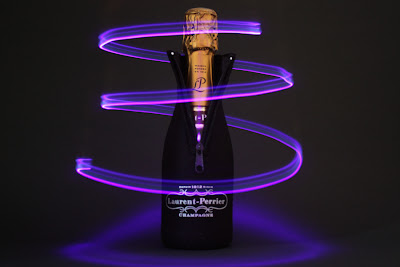


    I hope I have been fairly clear in this tutorial and it all makes sense! If there are any glaring mistakes or you're having trouble following the steps then please comment and I will rectify / give you some pointers.

    Monday, 6 June 2011

    Cherry Picking

    No particular theme to this picture. Was just enjoying some black cherries the other day and had the camera to hand so took a few pictures.


    As usual, click on the image to enlarge

    Thursday, 26 May 2011

    LED Lamp

    Merging an old light source with a modern LED.

    I created this image using a home made UV LED pointer and merging a couple of photos.


    These types of shots are very quick and easy to do. I will post a quick guide on how to create these sort of images soon.

    As usual, click on the image to enlarge (It looks a bit better too!).